

Introduction
A good way to learn JavaScript is to build a real application instead of studying individual syntax rules separately.
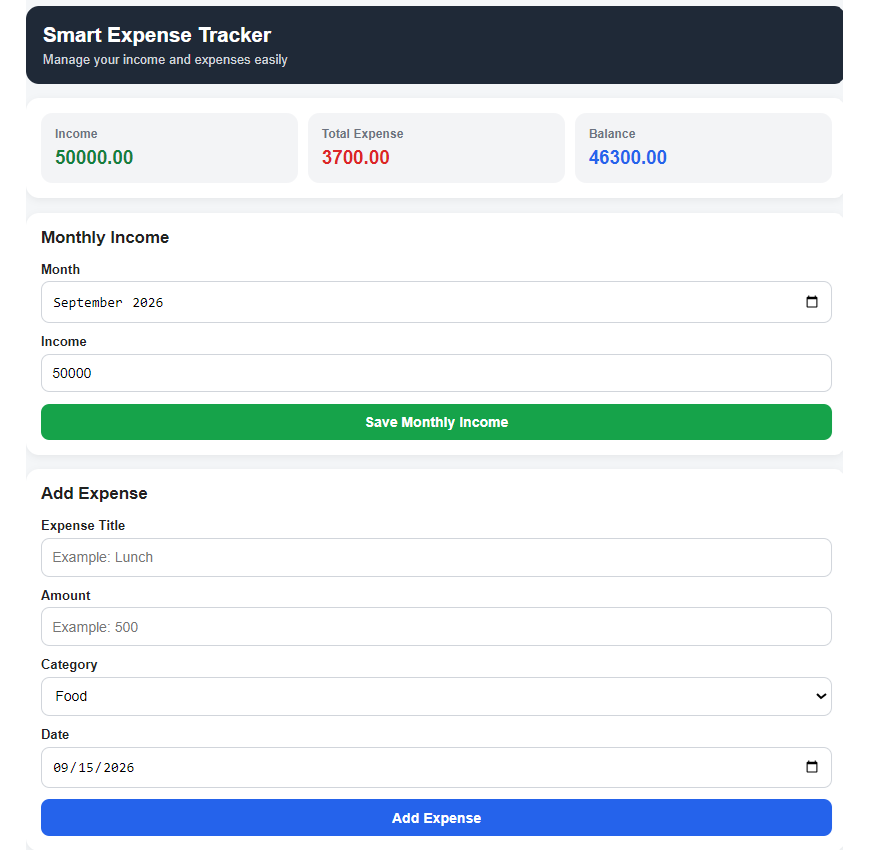
In this project, we will build a Smart Expense Tracker using HTML, CSS and JavaScript.
The application allows users to:
- Add expenses
- Edit expenses
- Delete expenses
- Search expenses
- Filter expenses by category
- Sort expenses
- Add and manage categories
- Add monthly income
- Calculate balance
- View category summaries
- View monthly summaries
- Store data permanently using LocalStorage
- Reset demo data
- Clear all expenses
- Use the application comfortably on mobile devices
The entire application is contained in one HTML file.
1. What We Will Learn
This project covers many important JavaScript concepts used in real applications.
JavaScript fundamentals
- Variables
constandlet- Arrays
- Objects
- Functions
- Conditions
- Loops
- Template literals
Array methods
push()find()findIndex()filter()map()reduce()sort()some()
DOM manipulation
getElementById().value.textContent.innerHTMLaddEventListener()
Browser storage
localStorageJSON.stringify()JSON.parse()
Application concepts
- CRUD
- Search
- Filtering
- Sorting
- Dynamic UI rendering
- Data persistence
- Data validation
- State management
2. What Is CRUD?
CRUD stands for:
| Operation | Meaning | Our Project |
|---|---|---|
| Create | Add new data | Add Expense |
| Read | Display data | Expense List |
| Update | Modify data | Edit Expense |
| Delete | Remove data | Delete Expense |
CRUD is one of the most important concepts in web application development.
Our Expense Tracker is essentially a small CRUD application.
3. How Expense Data Is Stored
Each expense is represented by an object.
For example:
{
    id: 1,
    title: "Food",
    amount: 500,
    category: "Food",
    date: "2026-09-01"
}
Multiple expenses are stored inside an array:
const expenses = [
    {
        id: 1,
        title: "Food",
        amount: 500,
        category: "Food",
        date: "2026-09-01"
    },
    {
        id: 2,
        title: "Transport",
        amount: 200,
        category: "Transport",
        date: "2026-09-03"
    }
];
This is a very common JavaScript data structure:
Array → containing Objects
4. Why Do We Need an ID?
Every expense receives a unique id.
For example:
{
    id: 1,
    title: "Food"
}
The ID allows us to identify a specific expense.
For example, when the user clicks Edit, JavaScript can find the correct object by its ID.
This is similar to how databases use primary keys.
5. Adding a New Expense
When the user submits the form, we create a new object:
const newExpense = {
    id: Date.now(),
    title: titleInput.value,
    amount: Number(amountInput.value),
    category: categoryInput.value,
    date: dateInput.value
};
Then we add it to the array:
expenses.push(newExpense);Why use Number()?
Form input values normally come from HTML as strings.
For example:
"500"But we need a number for calculations:
500So we use:
Number(amountInput.value)6. Calculating Total Expenses
We use the reduce() method.
const total = expenses.reduce(function(sum, expense) {
    return sum + expense.amount;
}, 0);
Here:
sumstores the running total.expenserepresents the current object.0is the initial value.
For example:
500 + 200 + 1000 + 2000 = 37007. Displaying Expenses
JavaScript creates the expense list dynamically.
We use:
expenses.forEach(...)and then generate HTML using template literals.
Example:
`
<div>
    <h3>${expense.title}</h3>
    <p>${expense.amount}</p>
</div>
`
The ${} syntax allows JavaScript values to be inserted directly into a template string.
8. Searching Expenses
The application includes a search box.
We use:
filter()For example:
expenses.filter(function(expense) {
    return expense.title.toLowerCase().includes(searchTerm);
});
If the user searches for:
foodthe application can find expenses such as:
Food
Lunch Food
Restaurant Food
9. Filtering by Category
We can filter expenses by category:
expenses.filter(function(expense) {
    return expense.category === categoryFilter.value;
});
For example:
All
Food
Transport
Bills
Shopping
If the user selects Food, only Food expenses are displayed.
10. Sorting Expenses
The application supports several sorting options:
- Newest first
- Oldest first
- Highest amount
- Lowest amount
JavaScript’s sort() method is used for this.
For example:
expenses.sort(function(a, b) {
    return b.amount - a.amount;
});
This sorts expenses from highest amount to lowest amount.
11. Category Management
Users can create their own categories.
For example:
Food
Transport
Bills
Shopping
Education
Health
Entertainment
The category list is stored separately in LocalStorage.
When a new category is added, the expense form’s category dropdown is updated automatically.
12. Why Can’t a Used Category Be Deleted?
Suppose we have:
Food → 5 expensesIf we delete the Food category, those existing expenses would still contain:
category: "Food"That would create inconsistent data.
Therefore, before deleting a category, the application checks:
const used = expenses.some(function(expense) {
    return expense.category === category;
});
If the category is already being used, deletion is prevented.
This is an example of data integrity.
13. Monthly Income
The application also allows the user to enter income for a particular month.
For example:
September 2026 → 50,000Monthly income is stored using an object:
{
    "2026-09": 50000
}
The month itself becomes the key.
14. Calculating Balance
The basic calculation is:
Balance = Income - ExpenseFor example:
Income  = 50,000
Expense = 3,700

Balance = 46,300
The application calculates this automatically.
15. Monthly Summary
The application generates a monthly summary containing:
- Month
- Income
- Expense
- Balance
For example:
| Month | Income | Expense | Balance |
|---|---|---|---|
| September 2026 | 50,000 | 3,700 | 46,300 |
This is generated dynamically from the stored data.
16. LocalStorage
If we only stored expenses in a JavaScript variable:
let expenses = [];the data would disappear when the browser is refreshed.
To prevent this, we use:
localStorageFor example:
localStorage.setItem(
    "expenses",
    JSON.stringify(expenses)
);
Because LocalStorage stores strings, we convert the array into JSON.
To retrieve it:
const savedExpenses = localStorage.getItem("expenses");Then convert it back:
JSON.parse(savedExpenses);17. JSON.stringify() vs JSON.parse()
This is an important interview topic.
JavaScript → JSON string
JSON.stringify(data);JSON string → JavaScript
JSON.parse(data);So:
JavaScript Object/Array
        ↓
JSON.stringify()
        ↓
String
        ↓
localStorage
And when reading:
localStorage
        ↓
String
        ↓
JSON.parse()
        ↓
JavaScript Object/Array
18. Data Normalization
The application also protects itself from older or incomplete stored data.
For example:
loadedExpenses = loadedExpenses.map(function(expense) {
    return {
        id: expense.id ?? Date.now(),
        title: expense.title ?? "Untitled",
        amount: Number(expense.amount) || 0,
        category: expense.category ?? "Other",
        date: expense.date || today
    };
});
This makes sure every expense has the expected fields.
This is useful when an application evolves and its data structure changes over time.
19. DOM Manipulation
The application uses JavaScript to control the HTML interface.
For example:
document.getElementById("titleInput");gets an HTML element.
We can read its value:
titleInput.valueWe can change displayed text:
balance.textContent = currentBalance;And we can dynamically create HTML:
expenseList.innerHTML = html;This is called DOM manipulation.
20. preventDefault()
When a form is submitted, the browser normally reloads the page.
We don’t want that.
Therefore:
form.addEventListener("submit", function(event) {
    event.preventDefault();
});
preventDefault() stops the browser’s default form submission behavior.
21. Editing an Expense
A particularly important part of this application is editing.
When the user clicks Edit, we store the ID of the expense being edited.
For example:
let editingId = null;When editing starts:
editingId = expense.id;The form is then filled with the existing information.
When the form is submitted, JavaScript finds the matching expense and updates it instead of creating a completely unrelated record.
This is a proper Update operation in CRUD.
22. Complete Application Flow
The overall application works like this:
User enters expense
        ↓
Form validation
        ↓
Create/Update expense object
        ↓
Update expenses array
        ↓
Save to LocalStorage
        ↓
Refresh UI
        ↓
Calculate summaries
        ↓
Display updated data
When the page is opened:
Open application
        ↓
Read LocalStorage
        ↓
Load expenses/categories/income
        ↓
Render UI
23. Interview Questions and Answers
Q1. What is CRUD?
Answer:
CRUD stands for Create, Read, Update and Delete. These are the four basic operations used to manage data in an application.
Q2. Why did you use an array of objects?
Answer:
Each expense is represented as an object, while the array allows me to store multiple expenses and use JavaScript array methods such as filter(), map(), reduce() and sort().
Q3. Why did you use const for the expenses array?
Answer:
The array reference does not need to be reassigned. I can still modify the contents of a const array using methods such as push().
For example:
const expenses = [];

expenses.push(newExpense);
This is valid.
Q4. What is the difference between const and let?
Answer:const cannot be reassigned after initialization, while let can be reassigned.
For example:
const name = "John";cannot later become another value.
But:
let total = 0;
total = 500;
is valid.
Q5. Why do you use Number()?
Answer:
HTML input values are received as strings. Number() converts the value into a number so that mathematical operations work correctly.
Q6. What does filter() do?
Answer:filter() creates a new array containing only the elements that satisfy a condition.
Q7. What does map() do?
Answer:map() creates a new array by transforming each element of an existing array.
Q8. What does reduce() do?
Answer:reduce() processes an array and combines its elements into a single result. In this project, I use it to calculate the total expense.
Q9. What does find() do?
Answer:find() returns the first array element that satisfies a condition.
Q10. What does findIndex() do?
Answer:findIndex() returns the index of the first element that satisfies a condition.
It is useful when I need to update an object inside an array.
Q11. What does some() do?
Answer:some() checks whether at least one array element satisfies a condition. I use it to check whether a category is already being used.
Q12. Why use LocalStorage?
Answer:
LocalStorage allows the application to persist data in the browser so that the data remains available after refreshing the page.
Q13. What is JSON.stringify()?
Answer:
It converts a JavaScript object or array into a JSON string.
Q14. What is JSON.parse()?
Answer:
It converts a JSON string back into a JavaScript object or array.
Q15. Why do you use preventDefault()?
Answer:
I use preventDefault() to stop the browser from performing the default form submission and reloading the page.
Q16. How does the search feature work?
Answer:
The application takes the user’s search term and uses filter() to return expenses whose titles contain the search text.
Q17. How is the balance calculated?
Answer:
Balance = Monthly Income - Monthly ExpenseQ18. How does the edit feature work?
Answer:
When the user selects an expense for editing, its ID is stored. After the form is submitted, the application finds that expense using its ID and updates the existing object.
Q19. What is DOM manipulation?
Answer:
DOM manipulation means using JavaScript to read, modify, create or remove HTML elements and their content dynamically.
Q20. How would you improve this application in the future?
Answer:
I could migrate the application to React or React Native, use SQLite for mobile/local database storage, add authentication and cloud synchronization, and eventually connect it to a backend API.
24. Possible Future Improvements
This project can later be expanded with:
- User authentication
- Cloud synchronization
- SQLite
- React
- React Native
- Charts
- PDF reports
- CSV export
- Budget limits
- Recurring expenses
- Multiple currencies
- Dark mode
- Backend API
- Cloud backup
However, the current version intentionally remains a pure HTML, CSS and JavaScript project.
Complete index.html
Below is the corrected final version. The important correction is that editing now performs a real Update instead of deleting the old record and creating an unrelated new record.
<!DOCTYPE html>
<html lang="en">
<head>
<meta charset="UTF-8">
<meta name="viewport" content="width=device-width, initial-scale=1.0">
<title>Smart Expense Tracker</title>
<style>
* {
box-sizing: border-box;
}
body {
margin: 0;
font-family: Arial, sans-serif;
background: #f4f7fb;
color: #222;
}
.container {
width: min(1100px, 94%);
margin: auto;
padding: 20px 0 40px;
}
h1 {
text-align: center;
margin-bottom: 25px;
}
h2 {
margin-top: 0;
}
.cards {
display: grid;
grid-template-columns: repeat(3, 1fr);
gap: 15px;
margin-bottom: 20px;
}
.card {
background: white;
padding: 20px;
border-radius: 12px;
box-shadow: 0 3px 12px rgba(0,0,0,0.08);
}
.card p {
margin: 5px 0 0;
font-size: 24px;
font-weight: bold;
}
.section {
background: white;
padding: 20px;
margin-bottom: 20px;
border-radius: 12px;
box-shadow: 0 3px 12px rgba(0,0,0,0.06);
}
form {
display: grid;
gap: 12px;
}
input,
select,
button {
width: 100%;
padding: 11px;
border-radius: 8px;
border: 1px solid #ccc;
font-size: 15px;
}
button {
border: none;
cursor: pointer;
background: #222;
color: white;
}
button:hover {
opacity: 0.9;
}
.danger {
background: #c62828;
}
.secondary {
background: #555;
}
.success {
background: #16794c;
}
.controls {
display: grid;
grid-template-columns: 2fr 1fr 1fr;
gap: 10px;
margin-bottom: 15px;
}
.expense-item {
border: 1px solid #ddd;
border-radius: 10px;
padding: 15px;
margin-bottom: 10px;
}
.expense-top {
display: flex;
justify-content: space-between;
gap: 10px;
}
.expense-title {
font-weight: bold;
font-size: 17px;
}
.expense-amount {
font-weight: bold;
}
.expense-meta {
color: #666;
margin-top: 6px;
font-size: 14px;
}
.actions {
display: flex;
gap: 8px;
margin-top: 12px;
}
.actions button {
width: auto;
padding: 8px 12px;
}
.category-row {
display: flex;
align-items: center;
justify-content: space-between;
gap: 10px;
padding: 8px 0;
border-bottom: 1px solid #eee;
}
.category-row button {
width: auto;
padding: 7px 10px;
}
.summary-row {
display: grid;
grid-template-columns: repeat(4, 1fr);
gap: 10px;
padding: 12px 0;
border-bottom: 1px solid #eee;
}
.message {
margin-top: 8px;
color: #c62828;
font-size: 14px;
}
.empty {
text-align: center;
color: #777;
padding: 20px;
}
@media (max-width: 700px) {
.cards {
grid-template-columns: 1fr;
}
.controls {
grid-template-columns: 1fr;
}
.summary-row {
grid-template-columns: 1fr 1fr;
}
.expense-top {
flex-direction: column;
}
}
</style>
</head>
<body>
<div class="container">
<h1>Smart Expense Tracker</h1>
<!-- Summary -->
<div class="cards">
<div class="card">
<h3>Monthly Income</h3>
<p id="incomeSummary">0</p>
</div>
<div class="card">
<h3>Monthly Expense</h3>
<p id="expenseSummary">0</p>
</div>
<div class="card">
<h3>Balance</h3>
<p id="balanceSummary">0</p>
</div>
</div>
<!-- Monthly Income -->
<div class="section">
<h2>Monthly Income</h2>
<form id="incomeForm">
<input
type="month"
id="incomeMonth"
required
>
<input
type="number"
id="incomeInput"
placeholder="Income amount"
min="0"
step="0.01"
required
>
<button type="submit" class="success">
Save Monthly Income
</button>
</form>
</div>
<!-- Expense Form -->
<div class="section">
<h2 id="formTitle">Add Expense</h2>
<form id="expenseForm">
<input
type="text"
id="titleInput"
placeholder="Expense title"
required
>
<input
type="number"
id="amountInput"
placeholder="Amount"
min="0"
step="0.01"
required
>
<select id="categoryInput" required></select>
<input
type="date"
id="dateInput"
required
>
<button type="submit" id="submitButton">
Add Expense
</button>
<button
type="button"
id="cancelEditButton"
class="secondary"
style="display:none;"
>
Cancel Edit
</button>
</form>
</div>
<!-- Search / Filter / Sort -->
<div class="section">
<h2>Find Expenses</h2>
<div class="controls">
<input
type="text"
id="searchInput"
placeholder="Search expense..."
>
<select id="categoryFilter">
<option value="All">All Categories</option>
</select>
<select id="sortSelect">
<option value="newest">Newest</option>
<option value="oldest">Oldest</option>
<option value="high">Amount High → Low</option>
<option value="low">Amount Low → High</option>
</select>
</div>
</div>
<!-- Expense List -->
<div class="section">
<h2>Expenses</h2>
<div id="expenseList"></div>
</div>
<!-- Category Summary -->
<div class="section">
<h2>Category Summary</h2>
<div id="categorySummary"></div>
</div>
<!-- Category Settings -->
<div class="section">
<h2>Category Settings</h2>
<form id="categoryForm">
<input
type="text"
id="newCategoryInput"
placeholder="New category"
required
>
<button type="submit">
Add Category
</button>
</form>
<div id="categoryMessage" class="message"></div>
<div id="categorySettings"></div>
</div>
<!-- Monthly Summary -->
<div class="section">
<h2>Monthly Summary</h2>
<div id="monthlySummary"></div>
</div>
<!-- Data Controls -->
<div class="section">
<h2>Data Controls</h2>
<button id="clearButton" class="danger">
Clear All Expenses
</button>
<br><br>
<button id="resetButton" class="secondary">
Reset Demo Data
</button>
</div>
</div>
<script>
// -----------------------------
// Default Data
// -----------------------------
const defaultCategories = [
"Food",
"Transport",
"Bills",
"Shopping"
];
const defaultExpenses = [
{
id: 1,
title: "Food",
amount: 500,
category: "Food",
date: "2026-09-01"
},
{
id: 2,
title: "Transport",
amount: 200,
category: "Transport",
date: "2026-09-03"
},
{
id: 3,
title: "Internet",
amount: 1000,
category: "Bills",
date: "2026-09-05"
},
{
id: 4,
title: "Shopping",
amount: 2000,
category: "Shopping",
date: "2026-09-10"
}
];
const today = new Date()
.toISOString()
.split("T")[0];
const currentMonth = today.substring(0, 7);
// -----------------------------
// Load Categories
// -----------------------------
const savedCategories =
localStorage.getItem("categories");
let categories = savedCategories
? JSON.parse(savedCategories)
: [...defaultCategories];
// -----------------------------
// Load Expenses
// -----------------------------
const savedExpenses =
localStorage.getItem("expenses");
let loadedExpenses = savedExpenses
? JSON.parse(savedExpenses)
: [...defaultExpenses];
// Normalize old/incomplete data
loadedExpenses = loadedExpenses.map(function(expense) {
return {
id: expense.id ?? Date.now(),
title: expense.title ?? "Untitled",
amount: Number(expense.amount) || 0,
category: expense.category ?? "Other",
date: expense.date || today
};
});
const expenses = loadedExpenses;
// -----------------------------
// Load Monthly Income
// -----------------------------
const savedMonthlyIncome =
localStorage.getItem("monthlyIncome");
let monthlyIncome = savedMonthlyIncome
? JSON.parse(savedMonthlyIncome)
: {
"2026-09": 50000
};
// -----------------------------
// DOM Elements
// -----------------------------
const expenseForm =
document.getElementById("expenseForm");
const titleInput =
document.getElementById("titleInput");
const amountInput =
document.getElementById("amountInput");
const categoryInput =
document.getElementById("categoryInput");
const dateInput =
document.getElementById("dateInput");
const submitButton =
document.getElementById("submitButton");
const cancelEditButton =
document.getElementById("cancelEditButton");
const formTitle =
document.getElementById("formTitle");
const expenseList =
document.getElementById("expenseList");
const searchInput =
document.getElementById("searchInput");
const categoryFilter =
document.getElementById("categoryFilter");
const sortSelect =
document.getElementById("sortSelect");
const categorySummary =
document.getElementById("categorySummary");
const categoryForm =
document.getElementById("categoryForm");
const newCategoryInput =
document.getElementById("newCategoryInput");
const categorySettings =
document.getElementById("categorySettings");
const categoryMessage =
document.getElementById("categoryMessage");
const incomeForm =
document.getElementById("incomeForm");
const incomeMonth =
document.getElementById("incomeMonth");
const incomeInput =
document.getElementById("incomeInput");
const incomeSummary =
document.getElementById("incomeSummary");
const expenseSummary =
document.getElementById("expenseSummary");
const balanceSummary =
document.getElementById("balanceSummary");
const monthlySummary =
document.getElementById("monthlySummary");
const clearButton =
document.getElementById("clearButton");
const resetButton =
document.getElementById("resetButton");
// -----------------------------
// Edit State
// -----------------------------
let editingId = null;
// -----------------------------
// Save Expenses
// -----------------------------
function saveExpenses() {
localStorage.setItem(
"expenses",
JSON.stringify(expenses)
);
}
// -----------------------------
// Save Categories
// -----------------------------
function saveCategories() {
localStorage.setItem(
"categories",
JSON.stringify(categories)
);
}
// -----------------------------
// Save Monthly Income
// -----------------------------
function saveMonthlyIncome() {
localStorage.setItem(
"monthlyIncome",
JSON.stringify(monthlyIncome)
);
}
// -----------------------------
// Calculate Total
// -----------------------------
function calculateTotal(items) {
return items.reduce(function(sum, expense) {
return sum + expense.amount;
}, 0);
}
// -----------------------------
// Render Category Options
// -----------------------------
function renderCategoryOptions() {
categoryInput.innerHTML = "";
categories.forEach(function(category) {
const option =
document.createElement("option");
option.value = category;
option.textContent = category;
categoryInput.appendChild(option);
});
categoryFilter.innerHTML =
'<option value="All">All Categories</option>';
categories.forEach(function(category) {
const option =
document.createElement("option");
option.value = category;
option.textContent = category;
categoryFilter.appendChild(option);
});
}
// -----------------------------
// Render Category Settings
// -----------------------------
function renderCategorySettings() {
categorySettings.innerHTML = "";
categories.forEach(function(category, index) {
const row =
document.createElement("div");
row.className = "category-row";
const name =
document.createElement("span");
name.textContent = category;
const button =
document.createElement("button");
button.textContent = "Delete";
button.className = "danger";
button.addEventListener(
"click",
function() {
deleteCategory(index);
}
);
row.appendChild(name);
row.appendChild(button);
categorySettings.appendChild(row);
});
}
// -----------------------------
// Delete Category
// -----------------------------
function deleteCategory(index) {
const category = categories[index];
const used = expenses.some(function(expense) {
return expense.category === category;
});
if (used) {
categoryMessage.textContent =
"Cannot delete this category because expenses are using it.";
return;
}
categories.splice(index, 1);
saveCategories();
categoryMessage.textContent = "";
renderCategoryOptions();
renderCategorySettings();
}
// -----------------------------
// Get Visible Expenses
// -----------------------------
function getVisibleExpenses() {
const searchTerm =
searchInput.value
.trim()
.toLowerCase();
const selectedCategory =
categoryFilter.value;
let visibleExpenses =
expenses.filter(function(expense) {
const matchesSearch =
expense.title
.toLowerCase()
.includes(searchTerm);
const matchesCategory =
selectedCategory === "All" ||
expense.category === selectedCategory;
return matchesSearch && matchesCategory;
});
// Sorting
const sortValue =
sortSelect.value;
if (sortValue === "newest") {
visibleExpenses.sort(function(a, b) {
return new Date(b.date) -
new Date(a.date);
});
}
if (sortValue === "oldest") {
visibleExpenses.sort(function(a, b) {
return new Date(a.date) -
new Date(b.date);
});
}
if (sortValue === "high") {
visibleExpenses.sort(function(a, b) {
return b.amount - a.amount;
});
}
if (sortValue === "low") {
visibleExpenses.sort(function(a, b) {
return a.amount - b.amount;
});
}
return visibleExpenses;
}
// -----------------------------
// Render Expenses
// -----------------------------
function renderExpenses() {
const visibleExpenses =
getVisibleExpenses();
expenseList.innerHTML = "";
if (visibleExpenses.length === 0) {
expenseList.innerHTML =
'<div class="empty">No expenses found.</div>';
return;
}
visibleExpenses.forEach(function(expense) {
const item =
document.createElement("div");
item.className = "expense-item";
item.innerHTML = `
<div class="expense-top">
<div>
<div class="expense-title">
${expense.title}
</div>
<div class="expense-meta">
${expense.category} • ${expense.date}
</div>
</div>
<div class="expense-amount">
${expense.amount.toFixed(2)}
</div>
</div>
<div class="actions">
<button class="edit-button">
Edit
</button>
<button class="delete-button danger">
Delete
</button>
</div>
`;
const editButton =
item.querySelector(".edit-button");
const deleteButton =
item.querySelector(".delete-button");
editButton.addEventListener(
"click",
function() {
editExpense(expense.id);
}
);
deleteButton.addEventListener(
"click",
function() {
deleteExpense(expense.id);
}
);
expenseList.appendChild(item);
});
}
// -----------------------------
// Update Summary
// -----------------------------
function updateSummary() {
const currentMonthIncome =
Number(monthlyIncome[currentMonth] || 0);
const currentMonthExpenses =
expenses.filter(function(expense) {
return expense.date.substring(0, 7)
=== currentMonth;
});
const total =
calculateTotal(currentMonthExpenses);
const currentBalance =
currentMonthIncome - total;
incomeSummary.textContent =
currentMonthIncome.toFixed(2);
expenseSummary.textContent =
total.toFixed(2);
balanceSummary.textContent =
currentBalance.toFixed(2);
}
// -----------------------------
// Render Category Summary
// -----------------------------
function renderCategorySummary() {
categorySummary.innerHTML = "";
categories.forEach(function(category) {
const categoryExpenses =
expenses.filter(function(expense) {
return expense.category === category;
});
const total =
calculateTotal(categoryExpenses);
const row =
document.createElement("div");
row.className = "category-row";
row.innerHTML = `
<span>${category}</span>
<strong>${total.toFixed(2)}</strong>
`;
categorySummary.appendChild(row);
});
}
// -----------------------------
// Render Monthly Summary
// -----------------------------
function renderMonthlySummary() {
const monthlyTotals = {};
expenses.forEach(function(expense) {
const month =
expense.date.substring(0, 7);
if (!monthlyTotals[month]) {
monthlyTotals[month] = 0;
}
monthlyTotals[month] += expense.amount;
});
const months = new Set([
...Object.keys(monthlyTotals),
...Object.keys(monthlyIncome)
]);
const sortedMonths =
Array.from(months).sort().reverse();
monthlySummary.innerHTML = "";
sortedMonths.forEach(function(month) {
const income =
Number(monthlyIncome[month] || 0);
const expense =
Number(monthlyTotals[month] || 0);
const balance =
income - expense;
const row =
document.createElement("div");
row.className = "summary-row";
row.innerHTML = `
<span>${month}</span>
<span>Income: ${income.toFixed(2)}</span>
<span>Expense: ${expense.toFixed(2)}</span>
<span>Balance: ${balance.toFixed(2)}</span>
`;
monthlySummary.appendChild(row);
});
}
// -----------------------------
// Refresh UI
// -----------------------------
function refreshUI() {
renderCategoryOptions();
renderCategorySettings();
renderExpenses();
renderCategorySummary();
renderMonthlySummary();
updateSummary();
}
// -----------------------------
// Delete Expense
// -----------------------------
function deleteExpense(id) {
const index =
expenses.findIndex(function(expense) {
return expense.id === id;
});
if (index === -1) {
return;
}
expenses.splice(index, 1);
saveExpenses();
refreshUI();
}
// -----------------------------
// Edit Expense
// -----------------------------
function editExpense(id) {
const expense =
expenses.find(function(item) {
return item.id === id;
});
if (!expense) {
return;
}
editingId = id;
titleInput.value =
expense.title;
amountInput.value =
expense.amount;
categoryInput.value =
expense.category;
dateInput.value =
expense.date;
formTitle.textContent =
"Edit Expense";
submitButton.textContent =
"Update Expense";
cancelEditButton.style.display =
"block";
window.scrollTo({
top: 0,
behavior: "smooth"
});
}
// -----------------------------
// Cancel Edit
// -----------------------------
function cancelEdit() {
editingId = null;
expenseForm.reset();
dateInput.value = today;
formTitle.textContent =
"Add Expense";
submitButton.textContent =
"Add Expense";
cancelEditButton.style.display =
"none";
}
// -----------------------------
// Expense Form Submit
// -----------------------------
expenseForm.addEventListener(
"submit",
function(event) {
event.preventDefault();
const title =
titleInput.value.trim();
const amount =
Number(amountInput.value);
const category =
categoryInput.value;
const date =
dateInput.value;
if (!title) {
alert("Please enter an expense title.");
return;
}
if (
isNaN(amount) ||
amount < 0
) {
alert("Please enter a valid amount.");
return;
}
if (!date) {
alert("Please select a date.");
return;
}
// UPDATE
if (editingId !== null) {
const index =
expenses.findIndex(function(expense) {
return expense.id === editingId;
});
if (index !== -1) {
expenses[index] = {
...expenses[index],
title: title,
amount: amount,
category: category,
date: date
};
}
saveExpenses();
cancelEdit();
refreshUI();
return;
}
// CREATE
const newExpense = {
id: Date.now(),
title: title,
amount: amount,
category: category,
date: date
};
expenses.push(newExpense);
saveExpenses();
expenseForm.reset();
dateInput.value = today;
refreshUI();
}
);
// -----------------------------
// Search
// -----------------------------
searchInput.addEventListener(
"input",
renderExpenses
);
// -----------------------------
// Category Filter
// -----------------------------
categoryFilter.addEventListener(
"change",
renderExpenses
);
// -----------------------------
// Sorting
// -----------------------------
sortSelect.addEventListener(
"change",
renderExpenses
);
// -----------------------------
// Category Form
// -----------------------------
categoryForm.addEventListener(
"submit",
function(event) {
event.preventDefault();
const category =
newCategoryInput.value.trim();
if (!category) {
return;
}
const exists =
categories.some(function(item) {
return item.toLowerCase() ===
category.toLowerCase();
});
if (exists) {
categoryMessage.textContent =
"This category already exists.";
return;
}
categories.push(category);
saveCategories();
newCategoryInput.value = "";
categoryMessage.textContent = "";
refreshUI();
}
);
// -----------------------------
// Monthly Income Form
// -----------------------------
incomeForm.addEventListener(
"submit",
function(event) {
event.preventDefault();
const month =
incomeMonth.value;
const amount =
Number(incomeInput.value);
if (!month) {
alert("Please select a month.");
return;
}
if (
isNaN(amount) ||
amount < 0
) {
alert("Please enter a valid income amount.");
return;
}
monthlyIncome[month] =
amount;
saveMonthlyIncome();
refreshUI();
}
);
// -----------------------------
// Clear All Expenses
// -----------------------------
clearButton.addEventListener(
"click",
function() {
const confirmed =
confirm(
"Are you sure you want to delete all expenses?"
);
if (!confirmed) {
return;
}
expenses.length = 0;
saveExpenses();
cancelEdit();
refreshUI();
}
);
// -----------------------------
// Reset Demo Data
// -----------------------------
resetButton.addEventListener(
"click",
function() {
const confirmed =
confirm(
"Reset the application to demo data?"
);
if (!confirmed) {
return;
}
expenses.length = 0;
defaultExpenses.forEach(function(expense) {
expenses.push({
...expense
});
});
categories.length = 0;
defaultCategories.forEach(function(category) {
categories.push(category);
});
monthlyIncome = {
"2026-09": 50000
};
saveExpenses();
saveCategories();
saveMonthlyIncome();
cancelEdit();
refreshUI();
}
);
// -----------------------------
// Cancel Edit Button
// -----------------------------
cancelEditButton.addEventListener(
"click",
cancelEdit
);
// -----------------------------
// Initial Setup
// -----------------------------
dateInput.value = today;
incomeMonth.value = currentMonth;
refreshUI();
</script>
</body>
</html>Final Project Summary
This project is more than a simple calculator. It demonstrates how JavaScript can manage real application data and UI state.
You have practiced:
HTML → UI structure
CSS → responsive interface
JavaScript → application logic
Arrays + Objects → data management
DOM → dynamic interface
CRUD → application operations
LocalStorage → persistent browser data
filter/map/reduce/sort/find/some → practical array processing
That makes this a strong beginner-to-intermediate JavaScript portfolio project and, more importantly, a good foundation for later rebuilding the same application with React/React Native + SQLite.



Leave a Reply